Shop on Lazada
Mikrotik products
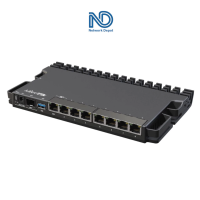
MikroTik RB5009UG+S+IN - Heavy-duty 1U Home Router with USB 3.0 1G and 2.5G Ethernet and a 10G SFP+ cage - RB5009 - RB4011 Upgrade
₱13,890.00₱15,000.00

JUANFI PisoWiFi Vendo Machine — MikroTik-Based Ready to Use Set with AP Wood/Metal Priority Connection & VLAN
₱29,590.00
Buy on Lazada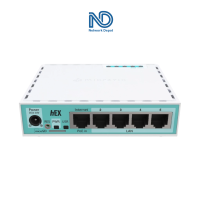
MikroTik RB750Gr3 hEX 5-port Gigabit Ethernet Dual Core 880MHz CPU 256MB RAM USB Bandwidth Management Router for Piso Wifi / Vendo - RB750 Gr3 - with Starlink Support
₱7,970.00
Buy on Lazada
Mikrotik CCR2004-16G-2S+ Cloud Core Router L6 1U Rackmount 16-Port 2 SFP+ Gigabit Router (CCR2004 16G 2S+)
₱32,850.00
Buy on Lazada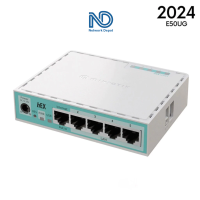
MikroTik hEX ″E50UG″ (2024 Version) – Upgraded 512MB RAM Dualcore ARM CPU (5) Gigabit Ports | hEX Refresh 2024 - E50UG
₱6,970.00
Buy on Lazada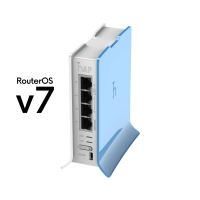
MikroTik haplite RB941 2nD TC Router with Wifi for Hotspot Piso Wifi or Vendo Business | Bandwidth Management Router - hAP lite v7
₱1,810.00₱1,990.00
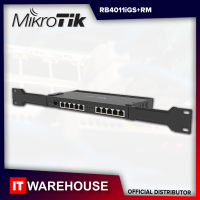
MikroTik RB4011 10-Port Gigabit SFP+ 10Gbps Quad-core 1.4Ghz CPU 1GB RAM Management Rackmount Router - RB4011iGS+RM
₱13,890.00₱15,000.00
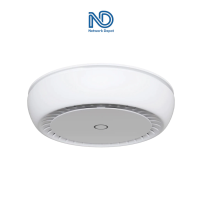
MikroTik cAP XL ac - High Gain Dual-band Dual-chain AC1200 Wi-fi Ceiling Access Point - PoE In and PoE Out
₱6,290.00
Buy on LazadaAbout Mikrotik
MikroTik is a Latvian networking technology company best known for its routers, switches, wireless equipment, and RouterOS, a network operating system designed to provide advanced routing and network-management capabilities at relatively accessible prices. Its products are used by Internet service providers (ISPs), businesses, network operators, and individual users around the world.1
Quick facts
| Item | Information |
|---|---|
| Brand | MikroTik |
| Company | SIA “Mikrotīkls” |
| Country | Latvia 🇱🇻 |
| Headquarters | Riga, Latvia |
| Founded | 1996 |
| Industry | Computer networking / telecommunications |
| Main software | RouterOS |
| Main hardware heritage | RouterBOARD |
| Major products | Routers, switches, wireless systems, LTE/5G equipment, IoT and networking hardware |
| Primary customers | ISPs, enterprises, small businesses, network professionals, enthusiasts, home users |
| Core strength | Highly configurable networking functionality and strong price/performance |
MikroTik describes itself as designing cost-efficient networking hardware and software for networks ranging from small offices to national ISPs, data centers, and large enterprises. The company also states that its product development cycle, from prototypes to finished products, takes place in the EU.2
History
MikroTik was established in Latvia in 1996. The company’s early focus was on developing networking technology for routers and wireless Internet service providers.
A major milestone came in 1997, when MikroTik created RouterOS. The software grew out of the company’s experience working with networking systems and was designed to provide sophisticated routing and network-management functions using standard computer hardware.3
Important milestones
- 1996 — MikroTik founded: The company was established in Latvia and initially focused on router and wireless ISP technology.
- 1997 — RouterOS: MikroTik developed its RouterOS operating system, which became the technological foundation of its networking products.4
- 2002 — RouterBOARD: MikroTik began producing its own networking hardware under the RouterBOARD brand. This allowed the company to combine its own hardware with RouterOS rather than relying exclusively on general-purpose PC hardware.5
- 2006 — First MUM: MikroTik held its first MikroTik User Meeting (MUM) in Prague. MUM events subsequently became an important part of the MikroTik ecosystem, bringing together users, administrators, trainers, and networking professionals.6
Today, MikroTik produces a broad range of networking equipment and software, with products used internationally.7
Brand and terminology
It is useful to distinguish MikroTik the company/brand from the technologies associated with it.
- MikroTik: The overall company and brand.
- RouterOS: The operating system that provides the networking functionality.
- RouterBOARD: Historically, the name used for MikroTik’s hardware platform and boards.
Modern MikroTik hardware includes many product families that are not necessarily marketed simply as “RouterBOARD,” but RouterBOARD remains an important part of MikroTik’s technical history and terminology.8
RouterOS
RouterOS is arguably the most important part of the MikroTik ecosystem. It is a network operating system based on the Linux kernel and designed to run on MikroTik hardware as well as virtual machines.9
The current RouterOS documentation describes it as providing functionality for:
- Routing
- Firewalling
- VPN
- Wireless networking
- Quality of Service (QoS)
- Network automation
- Monitoring
- Switching and bridging
- Routing protocols
- User management
- High availability
- Containers
- IoT
- LTE/mobile networking
- Storage10
This breadth of features distinguishes MikroTik from typical consumer Wi-Fi routers. While a basic consumer router might only expose settings for Internet, Wi-Fi, passwords, and DHCP, a MikroTik router exposes a comprehensive networking toolkit including interfaces, VLANs, bridges, routing, firewalls, NAT, QoS, VPNs, BGP/OSPF, wireless controls, monitoring, and automation. This makes MikroTik particularly attractive to network engineers and administrators.
Architecture
RouterOS essentially turns a MikroTik device into a programmable networking platform. The hardware and operating system work together; MikroTik sells hardware optimized for RouterOS, while RouterOS provides the software capabilities that make the hardware useful as a sophisticated network device.
Versions
MikroTik has gone through multiple generations of RouterOS. The current major generation is RouterOS v7. RouterOS v7 introduced substantial changes to the underlying system and networking stack compared with the older v6 generation, expanding and modernizing capabilities such as routing and package architecture.
MikroTik continues to maintain RouterOS and provide updates for supported hardware. The company states that even some hardware that is no longer manufactured can continue receiving newer RouterOS versions, provided that the hardware architecture and resources are compatible.11
Hardware portfolio
MikroTik’s hardware portfolio is considerably broader than ordinary home routers. The company’s documentation categorizes products into areas such as Ethernet routers, switches, wireless systems, indoor wireless, LTE products, IoT products, RouterBOARD, 60 GHz products, accessories, antennas, and networking interfaces.12
Major product families
- hAP: Refers to MikroTik’s home/office access-point and router products. These are among the products most likely to be encountered by ordinary users.
- CCR (Cloud Core Router): High-performance routers designed for demanding environments such as ISPs, data centers, and enterprise networks. They are substantially more powerful than typical home routers.
- CRS (Cloud Router Switch): Combines switching hardware with RouterOS/SwOS capabilities and is commonly used where Ethernet switching and advanced network management are required.
- CSS (Cloud Smart Switch): Devices focused heavily on switching that commonly use SwOS, MikroTik’s switch-oriented operating system.
- RB (RouterBOARD): An abbreviation historically associated with MikroTik’s RouterBOARD product line.
- wAP: Compact wireless access points designed for environments where a small or weather-resistant device is useful.
- SXT / LHG / SXTsq: Product families associated with specialized wireless links and outdoor networking, particularly relevant to WISP deployments and point-to-point or point-to-multipoint wireless networks.
- Chateau: Combines RouterOS routing functionality with wireless and, in some models, LTE/5G connectivity.
MikroTik uses a structured product naming system in which letters and numbers indicate characteristics such as product series, Ethernet interfaces, wireless interfaces, and other hardware features.13
SwOS
RouterOS is not the only operating system in the MikroTik ecosystem. SwOS is MikroTik’s operating system intended primarily for switches. Compared with RouterOS, SwOS is more focused on Ethernet switching rather than being a complete general-purpose routing platform.
MikroTik’s documentation specifically lists SwOS support for product families such as RB260, CSS326, CRS3xx, CSS610, and GPEN21.14
| Operating system | Main purpose |
|---|---|
| RouterOS | Routing + switching + firewall + wireless + VPN + network services |
| SwOS | Primarily Ethernet switching |
Key RouterOS features
Routing
Routing is one of MikroTik’s strongest areas. RouterOS supports conventional static routing as well as dynamic routing technologies. Depending on the platform and configuration, supported protocols include static routing, RIP, OSPF, BGP, MPLS, policy routing, ECMP, and VRF. This allows MikroTik equipment to be used in networks considerably more complicated than a typical home LAN.
Firewall
RouterOS contains a powerful stateful firewall. Administrators can create rules based on source IP, destination IP, protocol, port, interface, connection state, address lists, and packet marks. This allows MikroTik routers to perform both basic and sophisticated traffic filtering.
NAT
RouterOS supports common NAT functions including Source NAT, Destination NAT, Masquerade, and Port forwarding. For example, a MikroTik router can translate the private addresses of local devices into a public Internet address.
VLAN and switching
MikroTik is heavily used in networks based on VLANs. Network administrators can use VLANs to separate departments, guests, cameras, IoT devices, servers, and other traffic, making MikroTik particularly popular in professional networking environments.
VPN
RouterOS supports multiple VPN technologies. Depending on the RouterOS version and hardware, users can configure IPsec, WireGuard, OpenVPN, SSTP, L2TP, and PPP-based VPN services. This enables a MikroTik router to act as a site-to-site VPN gateway, remote-access VPN server, VPN client, or secure tunnel endpoint.
Wireless networking
MikroTik has a significant presence in wireless networking, with equipment ranging from ordinary indoor access points to specialized outdoor wireless systems. The company also produces specialized equipment for technologies such as 5 GHz and 60 GHz wireless networking.
ISP usage
One of MikroTik’s historically important markets is the Internet Service Provider (ISP) sector. A small ISP might use MikroTik for core routing and subscriber management. At larger scale, MikroTik equipment can participate in BGP routing, OSPF, VLAN aggregation, subscriber management, bandwidth management, PPPoE, DHCP, NAT, firewalling, wireless backhaul, and network monitoring. MikroTik states that its products are used by ISPs, businesses, and individual users around the world.15
PPPoE
MikroTik is particularly common in ISP networks using PPPoE. RouterOS can authenticate subscribers, assign IP addresses, apply bandwidth policies, and control traffic. This capability is one reason MikroTik is frequently encountered in smaller and medium-sized ISP deployments.
Management tools
WinBox
One of the most recognizable parts of the MikroTik ecosystem is WinBox, a graphical configuration and management application for RouterOS. Instead of configuring everything through a command line, an administrator can use a GUI to manage interfaces, IP addresses, routing, firewall, NAT, wireless, DHCP, VLANs, queues, VPN, and system settings. MikroTik also provides other management methods, including WebFig and command-line interfaces.
CLI
RouterOS has a powerful command-line interface. Configuration can be performed entirely from the CLI, making MikroTik attractive to network engineers who prefer automation and command-line administration.
WebFig
WebFig is the browser-based management interface for RouterOS. Instead of installing WinBox, an administrator can connect to the router through a web browser to manage the same underlying RouterOS system.
RouterBOOT
MikroTik hardware uses a bootloader called RouterBOOT. RouterBOOT is responsible for starting RouterOS on MikroTik hardware and provides functionality related to booting, recovery, and firmware management.16 RouterBOOT and RouterOS are distinct components and should not be confused.
Licensing and virtualization
Licensing
RouterOS historically used a licensing system with different levels. The licensing concept determines what functionality or usage model is available, particularly on systems where RouterOS is installed on x86 or virtual machines rather than on standard MikroTik hardware. For most MikroTik hardware, RouterOS is supplied as part of the device rather than requiring a separate software purchase.
Virtual machines
RouterOS can operate as a virtual machine, allowing it to run in virtualized infrastructure. MikroTik’s documentation explicitly describes RouterOS as a standalone Linux-kernel-based operating system that is also available for virtual machines.17 This is useful for laboratories, cloud environments, network testing, and some production deployments.
Product philosophy and positioning
A major characteristic of MikroTik is the combination of low-to-moderate hardware cost, powerful software, and extensive configurability. MikroTik describes its goal as making Internet technologies faster, more powerful, and accessible to a wider range of users.18 This philosophy has made MikroTik popular among users seeking capabilities normally associated with substantially more expensive networking equipment.
Network engineers value MikroTik because a relatively inexpensive device can provide advanced routing, VLANs, firewalling, VPN, QoS, BGP, OSPF, wireless, DHCP, DNS, PPPoE, hotspot, monitoring, traffic shaping, and automation. Exact capabilities depend on the hardware and RouterOS version, but the platform is considerably more flexible than the simplified firmware found on many consumer routers.19
Advantages
- Price-to-performance: Offers substantial networking functionality without the price of high-end enterprise equipment.
- Configurability: RouterOS exposes a vast number of configuration options.
- Scalability: The ecosystem ranges from small home routers to equipment designed for ISPs and data centers.
- Ecosystem: Extensive official documentation, training, user communities, and MUM events.
- Long software support: Supported older hardware can continue receiving RouterOS updates, subject to architecture and resource limitations.20
Disadvantages
- Learning curve: RouterOS is much more complicated than a typical consumer router interface. Understanding concepts like VLANs, routing tables, and firewall chains requires networking knowledge.
- Configuration risks: A poorly configured firewall, VLAN, routing table, or NAT rule can break connectivity or expose services.
- Complexity: For users who only need simple Wi-Fi and Internet access, a sophisticated MikroTik configuration may be unnecessary. MikroTik’s strength is control, not necessarily simplicity.
Comparisons
MikroTik vs. consumer routers
| Feature | Typical consumer router | MikroTik |
|---|---|---|
| Basic Wi-Fi | ✅ | ✅ |
| DHCP | ✅ | ✅ |
| NAT | ✅ | ✅ |
| Basic firewall | ✅ | ✅ |
| VLAN | Limited | ✅ |
| Advanced routing | Limited | ✅ |
| BGP | ❌ | ✅ |
| OSPF | Usually ❌ | ✅ |
| Advanced QoS | Limited | ✅ |
| Complex VPN | Limited | ✅ |
| ISP applications | Rarely | ✅ |
| Network automation | Limited | ✅ |
| Learning curve | Low | Higher |
| Configuration flexibility | Low–medium | Very high |
MikroTik is often considered a professional/enthusiast networking platform rather than simply a consumer Wi-Fi router brand.
MikroTik vs. Cisco
MikroTik is often compared with Cisco, although the two companies have different market positions. Cisco maintains a strong enterprise presence with a large-scale portfolio and extensive professional ecosystem, generally at higher equipment and licensing costs using IOS-family operating systems. In contrast, MikroTik offers strong price/performance, an extremely flexible RouterOS platform, and integrated hardware/software ecosystems. MikroTik is popular with ISPs, SMBs, enthusiasts, and network engineers, serving as a cost-effective platform for networks that do not require the specific enterprise ecosystem or support model of vendors like Cisco.
Typical users
- Home users: For advanced home networking, VLANs, VPNs, multiple Internet connections, and sophisticated firewall rules.
- Network engineers: For learning and deploying routing, switching, VPNs, wireless, and network automation.
- Small businesses: For centralized routing, firewalling, VLANs, VPNs, and Internet connectivity.
- ISPs / WISPs: For subscriber management, routing, bandwidth control, wireless links, and network infrastructure.
- Educational institutions: For networking laboratories and training.
- System integrators: For building customized network solutions for customers.
Ecosystem and community
The MikroTik ecosystem integrates hardware, software, and community resources. This integration is one of the brand’s defining characteristics.
Product naming
MikroTik product names (e.g., hAP ax³, CCR2004-16G-2S+, CRS326-24G-2S+, LHG 5) often encode information about the device. Official documentation explains that the naming system indicates characteristics such as the series, number of wired interfaces, wireless interfaces, and other hardware features.21 Once the naming conventions are understood, identifying the general purpose of a device becomes considerably easier.
Community
MikroTik has built a substantial technical community around its products, including official documentation, community forums, MUM events, training, consultants, network engineers, system integrators, and educational resources. The company has also developed a training ecosystem around RouterOS and MikroTik networking.
Current status
As of 2026, MikroTik continues to develop networking hardware and RouterOS, with its product range covering routers, switches, wireless systems, LTE/5G equipment, IoT products, and other networking technologies. Its official documentation continues to receive updates, including documentation for current hardware and RouterOS functionality.22 The current RouterOS documentation describes a platform that extends well beyond traditional routing, covering networking, security, wireless, VPN, automation, monitoring, containers, IoT, and other capabilities.23
References
- MikroTik · Company
- ContentsAbout………………………………
- Mikrotik foundations – General – MikroTik community forum
- RouterBOARD – RouterOS – MikroTik Documentation
- RouterBOOT | RouterOS Manual
- Getting started – RouterOS – MikroTik Documentation
- Introduction | RouterOS Manual
- Software Specifications – RouterOS – MikroTik Documentation
- User Manuals – User manuals – MikroTik Documentation
- Product Naming – RouterOS – MikroTik Documentation
- RouterOS – RouterOS – MikroTik Documentation
- RouterOS – RouterOS – MikroTik Documentation
- RouterOS – RouterOS – MikroTik Documentation
- RouterOS – RouterOS – MikroTik Documentation
- Packages – RouterOS – MikroTik Documentation
- RouterBOARD – RouterOS – MikroTik Documentation
- Branding – RouterOS – MikroTik Documentation
- [Discussion] MikroTik configuration abstraction complexity – #41 by Mesquite – General – MikroTik community forum
- [Discussion] MikroTik configuration abstraction complexity – Page 3 – General – MikroTik community forum
- RouterBOARD – User manuals – MikroTik Documentation
- MUM – MikroTik User Meeting
- MUM – MikroTik User Meeting
- 10 Years with Mikrotik – General – MikroTik community forum